
acf domain was triggered too early. This is usually an indicator for some code in the plugin or theme running too early. Translations should be loaded at the init action or later. Please see Debugging in WordPress for more information. (This message was added in version 6.7.0.) in /home2/hyperm16/so3d.com.br/wp-includes/functions.php on line 6170wp-pagenavi domain was triggered too early. This is usually an indicator for some code in the plugin or theme running too early. Translations should be loaded at the init action or later. Please see Debugging in WordPress for more information. (This message was added in version 6.7.0.) in /home2/hyperm16/so3d.com.br/wp-includes/functions.php on line 6170antispam-bee domain was triggered too early. This is usually an indicator for some code in the plugin or theme running too early. Translations should be loaded at the init action or later. Please see Debugging in WordPress for more information. (This message was added in version 6.7.0.) in /home2/hyperm16/so3d.com.br/wp-includes/functions.php on line 6170woocommerce-gateway-paypal-express-checkout domain was triggered too early. This is usually an indicator for some code in the plugin or theme running too early. Translations should be loaded at the init action or later. Please see Debugging in WordPress for more information. (This message was added in version 6.7.0.) in /home2/hyperm16/so3d.com.br/wp-includes/functions.php on line 6170


For Canadian adults who prefer a phone or tablet, a browser-based casino can be more practical than installing another app. The Canada-facing Spinsy experience is designed for Android and iOS browsers, with casino browsing, live tables, sports markets, account controls and cashier functions available from a responsive mobile site. If you are researching online casino spinsy, the key question is not simply whether the site opens on a small screen, but whether its navigation, shortcuts, connection requirements and account tools fit the way you actually use your phone.
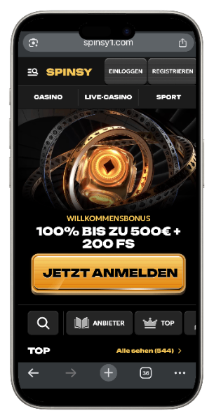
A responsive mobile website adjusts its layout to the available screen rather than requiring a separate desktop computer. On this platform, the mobile browser is intended to provide access to casino categories, live casino, sports betting, promotions, challenges, the rewards shop and account controls. That makes it possible to browse and manage an account while travelling, relaxing at home or using a tablet, provided the connection is stable and the service is available to you.
The casino lobby is built around search, category filters and provider filters. These tools matter more on a phone because scrolling through a large catalogue can quickly become tiring. Sections such as Top, New, Popular, Exclusive, Live Games, Instant Games, Slots, Table Games and jackpots give you several ways to narrow the display. Searching by title or provider can be more efficient than repeatedly swiping through unfamiliar games.
Mobile access also covers practical account areas rather than only game content. The source material indicates that users can reach the cashier, transaction information, bonus area, challenges, shop and VIP status through the mobile browser. However, the presence of a mobile menu does not guarantee that every page will feel equally convenient on every device. A larger tablet may be preferable for live tables, detailed terms or long verification forms, while a phone may suit quick browsing and account checks.
No native App Store or Google Play installation is required for the mobile experience described in the source material. Instead, users can create a shortcut that opens the mobile web account. This can make the service feel more like an app without changing the underlying technology. The shortcut leads back to the same mobile website, account and balance, so it should not be treated as a separate application with independent features.
On Android, the stated process uses the browser’s “Add to Home screen” option. On iOS, the shortcut can be added through the Share menu. Menu names may vary slightly depending on the browser version and device settings, but the general process is similar: open the mobile site, use the browser’s sharing or page-options control, choose the home-screen option, confirm the name and place the icon where it is easy to find.
Before relying on the shortcut, open it once and confirm that it loads the expected mobile page rather than an outdated browser tab. Keep the operating system and browser updated, and avoid creating shortcuts on shared devices where another person could access a signed-in session. A shortcut is simply a convenient doorway; it does not replace a strong password, screen lock or careful sign-out practice when a phone is borrowed or shared.
Mobile browsing is convenient, but it also creates trade-offs. A small display can make game information, promotion conditions and account notices harder to read. Touch controls may be less precise than a mouse, particularly on live tables or pages with several buttons close together. A slow connection can also affect loading, and switching between Wi-Fi and mobile data may interrupt a session or require a page refresh.
Verification is another area where a phone may be less comfortable. The account process can request personal information, and additional checks may require identity documents, proof of address, payment details or source-of-funds information. Taking clear photographs and uploading files from a phone is possible, but a computer can make it easier to inspect document quality, read instructions and keep track of which items have already been submitted.

Security deserves attention whenever gambling or payment-related accounts are accessed on mobile. Use a private connection where possible, keep device software current and avoid saving credentials in a browser on a shared phone. The Canadian Centre for Cyber Security provides general online-safety guidance that can help users make sensible decisions about passwords, devices and connections. These precautions do not confirm any casino-specific security feature; they are basic habits for protecting an online account.
The best device depends on the task rather than on a simple mobile-versus-desktop preference. A phone is useful when you want to search categories, check account information or review an active promotion while away from a desk. Its smaller size can also encourage shorter sessions, although that should never be treated as a substitute for setting personal limits before using gambling services.
A tablet offers a middle ground. Its larger screen can make filters, game details and live casino layouts easier to follow while retaining the convenience of a touch interface. It may be particularly helpful when comparing several titles or reading terms. The drawback is that tablets are more likely to be shared at home, so automatic login and stored payment information should be reviewed carefully.
A computer may remain the more comfortable option for registration, document uploads, detailed account administration and careful reading of bonus conditions. It can also provide a steadier view of several information panels at once. There is no requirement to use only one device: browsing can begin on a phone and continue on a computer, provided the account is accessed securely and any required verification or bonus conditions are checked in the account’s current information.
Start with the practical basics. Confirm that the browser is current, the device has enough battery and the connection is reliable. If you use a shortcut, test it before a session and make sure it opens the intended mobile website. Review privacy settings and decide whether browser notifications, saved passwords or automatic sign-in are appropriate for your device and household.
Next, inspect the information that matters to your particular activity. Promotions can carry activation, wagering, expiry or eligibility conditions, and the source material notes that current requirements should be checked in the account rather than assumed from older descriptions. Payment methods and limits can also vary by account, region and cashier display. If a withdrawal or verification request is important, read the current instructions carefully before submitting anything.
Finally, use the mobile format to support deliberate choices rather than constant checking. Search and category filters can reduce aimless browsing, while a clear stopping point can prevent a quick phone session from becoming longer than intended. If you need help with access, verification, technical issues or account changes, support is described as available through live chat and email. Ask support to confirm any requirement that is not clearly shown in your account, and do not rely on assumptions about available limits or tools.
No. The described mobile experience works through a responsive browser website on Android and iOS. A home-screen shortcut can be created for convenience, but it opens the same mobile web account rather than a separately installed App Store or Google Play application.
No. The shortcut is only a convenient way to open the mobile website. It uses the existing account and balance, so it does not create a separate profile or duplicate account. Treat the shortcut like a bookmark and protect the device with a screen lock.
Not necessarily. A phone can photograph and upload documents, but a tablet or computer may make forms, instructions and file checks easier to manage. Requirements can vary, so review the current request in the account and contact support if any document or submission step is unclear.
